
MU Helper and Offline Mode
MU Helper & Offline Mode
MU Helper hunts for your character: attacks mobs with its skills and combos, drinks potions, refreshes buffs and picks up loot. Offline Mode keeps attacking while you're offline.
- 1level for MU Helper
- Lvl × 20
 zen — one-time fee to start
 - 8 hoffline attack
MU Helper rules
When and where the helper works and how much it costs to start.
From level 1
MU Helper is available from level 1.
One-time fee
Starting it costs level × 20 zen — e.g. 8 000 at level 400. No hourly fee.
Not in safe-zone
MU Helper won't start in a safe-zone.
Where it doesn't work
Chaos Castle, Battle Royale, Duel Arena and Soccer Arena.
Offline attack
Your character keeps hunting while you're offline.
Where to turn it on
In the Offline Mode window of the main menu.
Run time
8 hours. With VIP EXP or All Inclusive 
 — 10 hours.
Self-sufficient
Your character buffs itself, drinks potions and repairs gear.
Start conditions
Not in a safe-zone and not while MU Helper is on.
While offline Your character doesn't pick up mob drops.
Two buttons and a hunt log
It all starts with the MU Helper panel.
Settings
The settings button opens the MU Helper settings.
Start

The MU Helper button starts the helper and your character starts attacking.
Hunt log
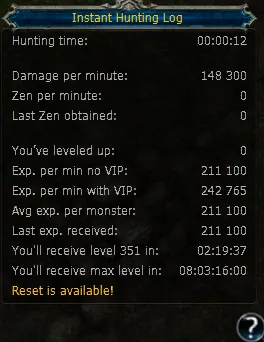
After starting, click the question mark above the MU Helper button — the hunt log opens.
Settings have three tabs:
Hunting, Obtaining and Other Settings.
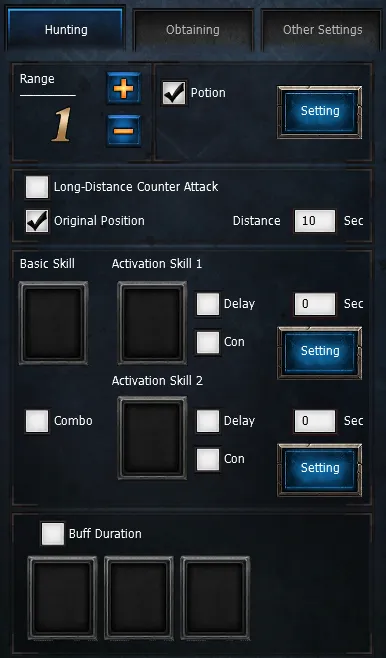
Don't forget to press Save Settingto apply the settings.
Done in three steps
Open the settings, go through the tabs and save.
- 1
Range and auto-heal
Attack range, reaction to enemies and automatic Healing Potion.
- 2
Skills and combo
Skills, COMBO order, attack conditions and auto-buffs.
- 3
Obtaining
Auto-pickup, item filter and auto-repair.
Start
Save the settings and press MU Helper — your character starts hunting.
The whole setup on video
Range and auto-heal
Set your character's attack range.
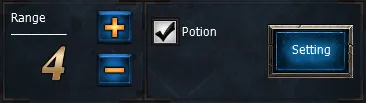
Standard distance — 2–4 cells. Bigger values make your character chase extra mobs or wander far from the spot.
Set how you react to enemy attacks.
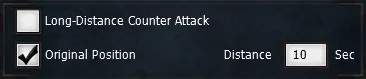
- Long-Distance Counter Attack — attacks enemies from max distance.
- Original Position — returns to the spot where MU Helper was turned on.
- Distance — delay in seconds before returning to that spot.
Tick the box to auto-use Healing Potion.
The Settings button sets the HP threshold for the potion.
Set the minimum HP (0–100 %) for Healing Potion and press Save setup.
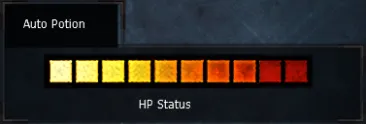
- Initialization — resets to defaults.
- Save setup — saves the settings.
- Cancel — cancels changes.
Skills and combo
Combat skills
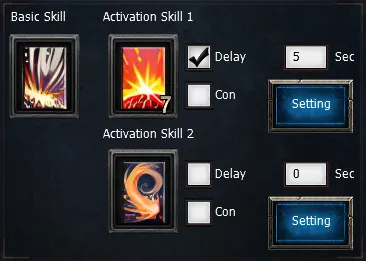
Pick one skill in Basic Skill or two — in Activation Skill 1 and Activation Skill 2.
For two skills, tick Delay and set the switch time in seconds (minimum 1).
COMBO
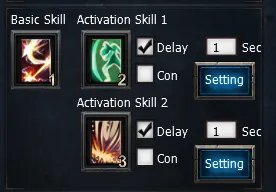
To attack with a combo, put the skills in the right order, tick Delay and set Delay Time.
For fine-tuning, tick Con and press Settings. Repeat for the 2nd skill if needed.
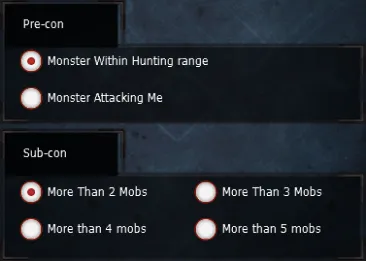
- Attack type: Skill 1 on all mobs in range or only on those attacking your character.
- Number of mobs that triggers the skill.
For buffs, turn on Buff Duration and put the buff icons into the slots.
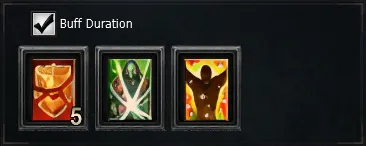
The buff refreshes every time it runs out.
Obtaining setup
Obtaining
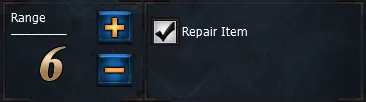
The auto-pickup radius is set by Range. Auto-repair for your gear is also turned on here.
Pickup modes:
- Pick All Near Items — pick up all items nearby.
- Pick Selected Items — pick up only selected items.
- Add Extra Item — type the item into the field and press Add.
You can save only 13 extra items in the list.
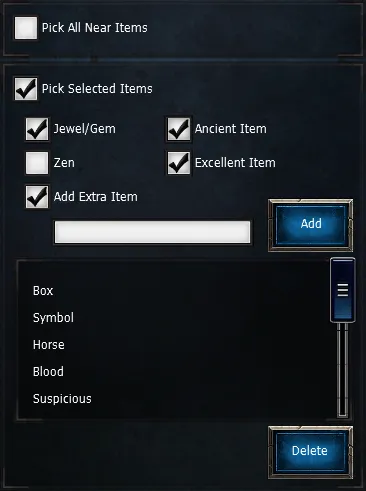
Let the hunt run itself
While MU Helper and Offline Mode level your character, plan your next reset.