

MUDREAM in your hands
The same servers, account and characters as on PC, with controls made for touch.
How to install
During the beta you install the game from a file, not from Google Play. It takes a few minutes.
1Download the APK
Tap Download APK at the top of the page and pick a mirror (Mega, Google Drive or another).
MuDream.apkis about 161 MB.2Open the file
When the download is done, tap
MuDream.apkin your browser's downloads.3Choose Package installer
If your phone asks what to open the file with, pick Package installer.
4Let your browser install apps
Android asks for permission once. Tap Settings, turn on Allow from this source, then go back.
5Install
Tap Install and wait for it to finish.
6Open the game
Tap Open, or find the MuDream icon on your home screen.
7Allow notifications
The game lets you know when the connection drops or your character dies. You can turn them off in the game settings.
8Wait for the update
On first launch the game downloads about 2.4 GB. That takes a few minutes, so use Wi-Fi if you can. Then log in with your MUDREAM account.
Made for your thumbs
Left thumb moves, right thumb fights.
What each button on the screen does.
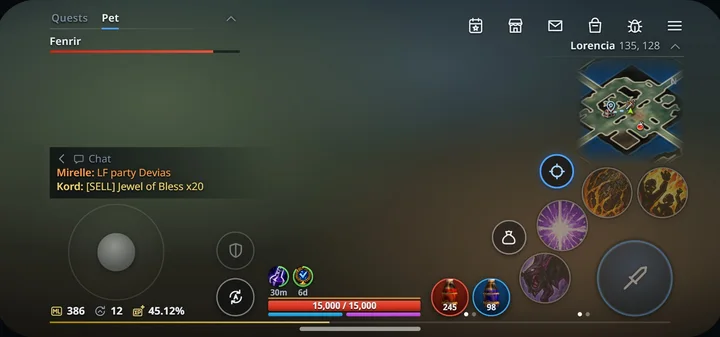
Joystick
- walk in that direction
- on the ground: walk there
Attack
- hit the target until it dies
- keep hitting, then switch to the next enemy
Skills4 per page, 2 pages
- use the skill
- the dots below: next page
Target switch
- next enemy
- automatic targets on / off
Lootgold: loot nearby
- pick up the nearest item
- list of the loot nearby
Potions
- drink
- choose what the slot holds
Autosettings: Menu → Helper
- auto hunting on / off
- open the Helper settings
PvP
- shield: monsters only, sword: players too
Menu and windows
- events, shop, mail, bag, bug report, main menu
Mini-map
- open the map and teleport
Click to open
Chat
- open the chat and write
- the arrow: hide or show the chat
Tap a glowing button on the screen to see what it does.
- Tap
- Hold
- Drag
- Swipe
- Let go
Move and resize the buttons: Menu → Edit HUD layout.
Play it before release
You get the mobile version early. Tell us what breaks and we fix it in the next builds.
Still in the works
- 64-bit phones only for now
- Android 8 and 9 not yet tested on real devices
- Performance on low-end chipsets
Found a bug?
- Report it right from the game
- Or post it in our Discord with a screenshot and your phone model
Questions about the mobile version
Do I need a new account?
No. Log in with your MUDREAM account. Your characters, items and guild are the same as on PC.
Why isn't it on Google Play?
During the beta we ship new builds faster from our own site. The game updates itself, so you only install it once.
Play Protect warns me. Is the file safe?
Android shows this warning for any app that doesn't come from Google Play. Download the APK only from mudream.online: we sign the file ourselves.
Will it run on my phone?
You need Android 8.0 or newer, a 64-bit phone with Vulkan support and about 3 GB of free space.
Is there an iPhone version?
Not yet. The beta starts on Android, iPhone comes later.