
News & Updates
MUDREAM 7.6 SOULFORGED
19 sep. 2026 22:00Customize your character with the new Skin Inventory, switch servers without leaving the game, and stay connected with your party through new Cross-Server features. The Chat and Friend System have been updated to make communication easier, while major Skill and Master Skill Tree changes bring new options for character progression. The update also brings a Summoner rework, the new Ruined Noria location, and an updated Seed System with a simpler way to craft and upgrade your Sockets.
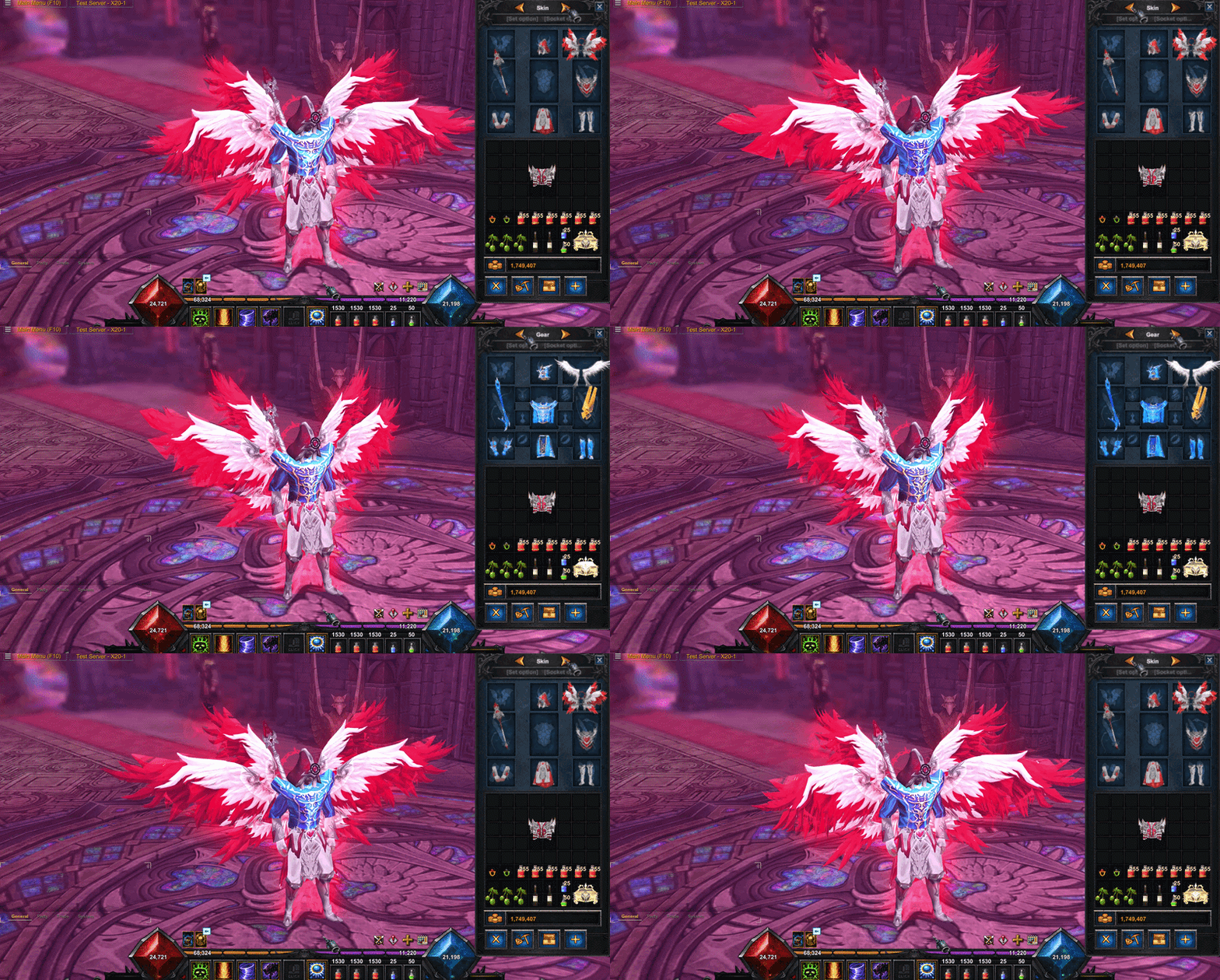
skin inventory
A new tab has been added — Skin Inventory for changing your character’s look.
You can equip skins and regular items in the Skin Inventory: weapons, armor, wings, and pets. These items only change your character’s look and do not affect stats or item requirements.
Weapons still follow the normal weapon type and equipment rules. The item must also match your character’s class.
⚠️ Note: If skin was previously transmogged to an item, use Pollen of Change to remove it and return the skin to your inventory.
New Chat
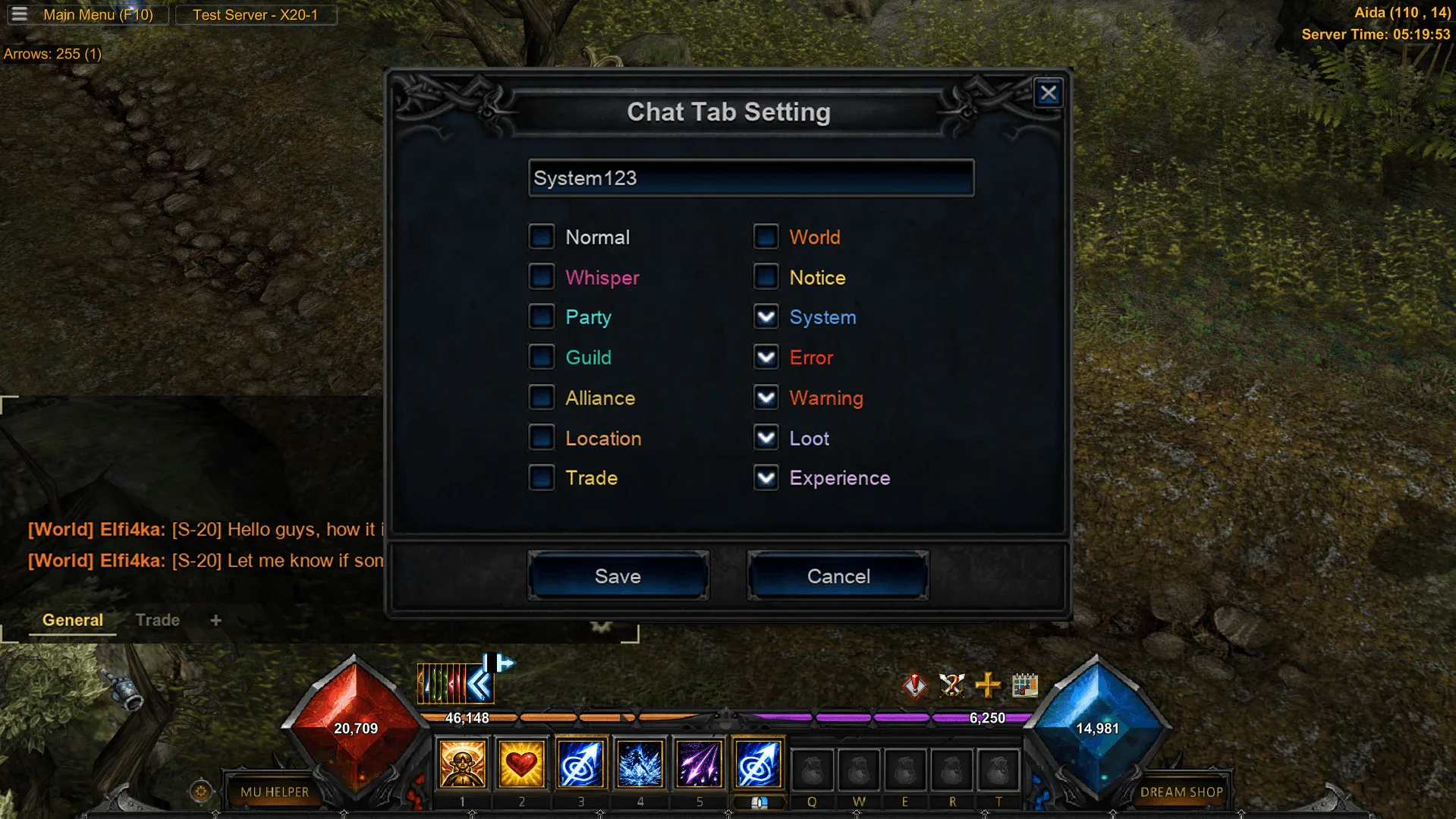
The chat system has been fully updated. You can now create up to 5 custom tabs, choose a name for each tab, and select which channels you want to see. New chat settings have been added: window size, transparency, font, line spacing, and message display time.
A new Ignore List for up to 50 players is now available. You can add or remove a player directly by clicking their name in chat.
All tabs, filters, settings, and your Ignore List are saved to your account and stay the same when you log in from another PC.
Friend list Update
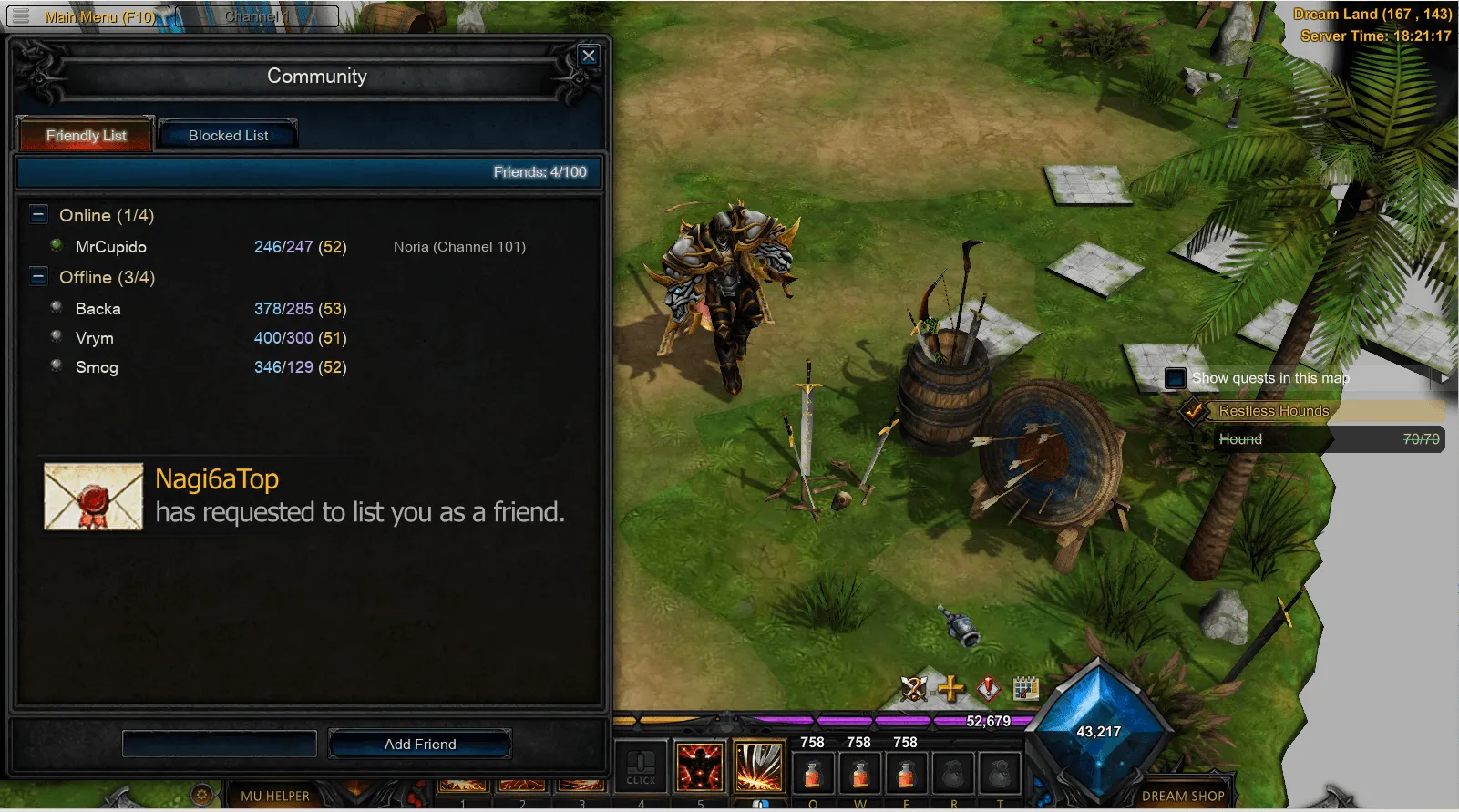
The Friend System has been fully updated. You can now open your Friend List from the F10 game menu or by pressing F.
The Friend List shows detailed character information: Level, Master Level, number of Resets, current location, and sub-server.
When you receive a new friend request, you will see a notification. All incoming requests are also available directly in the Friend List.
The second tab contains the Blacklist. Here you can see all blocked characters and remove them from the list at any time.
Cross-Server Changes
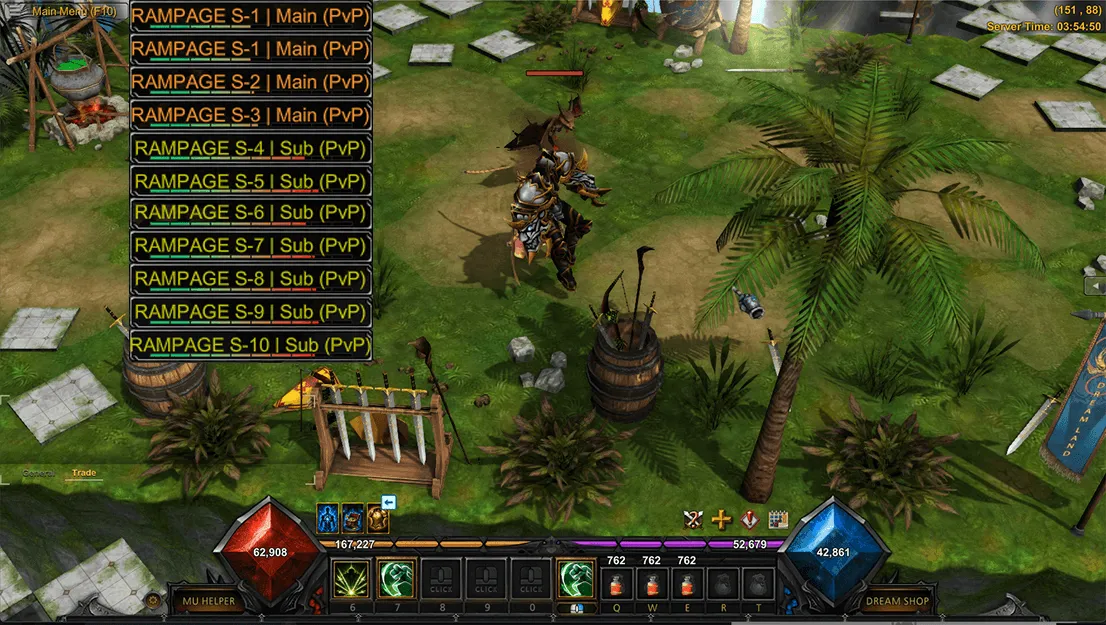
The sub-server system is now part of a cross-server environment. You can now switch between servers directly in the game — without logging out or selecting your character again. After switching, your character stays on the same map.
Party now works across servers. Party members, EXP bonuses, and party buffs stay active when you switch servers. Your party also stays together after a server restart. You can also see which party members are on another server.
Dream Land is now a cross-server zone, where players from different servers can meet together. When you leave Dream Land or enter the Event Zone, your character automatically returns to your original server.
Interface Update
The Skills window has been updated. The new interface shows all available skills and information about each one. Skills can be added to the hotbar with Drag & Drop or assigned to a key directly from the list.
The hotbar and buff panel have been updated. Icons and tooltips now show the effect type, duration, and description.
Character HP bars have been updated. Debuffs are now shown directly under the HP bar, making it easier to see the target’s current effects.
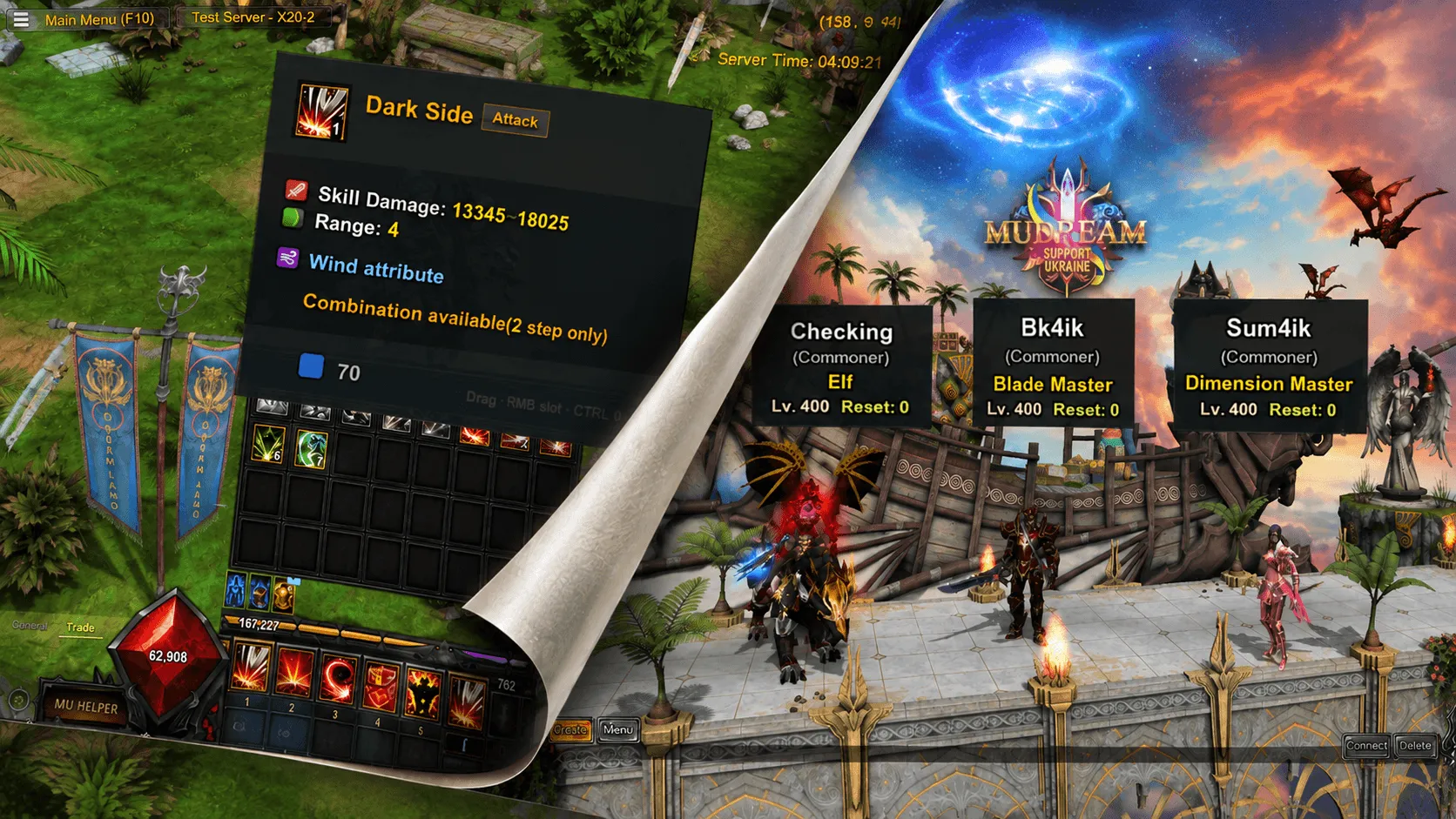
The Character Selection screen has been updated. Each character now shows their name, class, level, and number of resets.
Skill System & Master Skill Tree
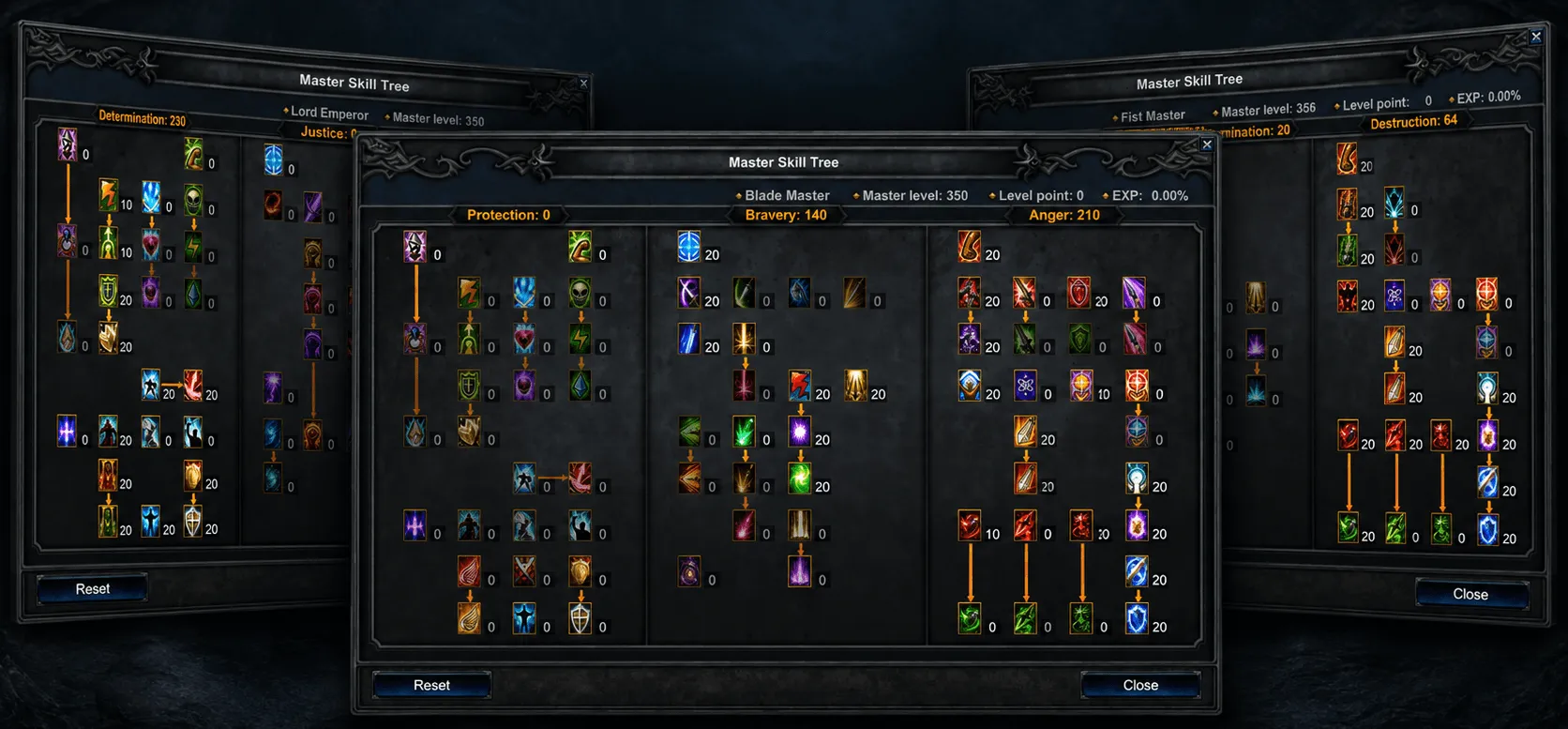
Skill System and Master Skill Tree have been updated. Skill names and descriptions were improved, terminology was unified, and skill parameters are now better synced between the client and server.
Several normal and Master Skills were adjusted, including range, cooldown, Mana and AG cost, as well as the mechanics of some skills.
Master Skill Tree has a new interface and a Reset button directly inside the window. Maximum Master Level has been increased to 400. Master EXP rate from level 300 to 400 is x0.5.


values of Monster SD Recovery, Monster Life Recovery, and Monster Mana Recovery have also been adjusted.
All classes received 6 new passive Master Skills:

Critical Damage Absorption — reduces Critical Damage received.

Excellent Damage Absorption — reduces Excellent Damage received.

Critical Damage Increase — increases Critical Damage dealt.

Excellent Damage Increase — increases Excellent Damage dealt.

Critical Damage Resistance — reduces the enemy's chance to deal Critical Damage.

Excellent Damage Resistance — reduces the enemy's chance to deal Excellent Damage.
SUMMONER REWORK


Weakness & Innovation
Weakness and Innovation have been fully reworked. Each skill now creates an area that applies a debuff to targets inside it. The debuff has a 100% chance to apply. Its effect is 10% against players and 15% against monsters, with a base duration of 10 seconds.
While the target stays inside the area, the debuff can be applied again after it ends, but its current duration is not refreshed or extended.
Weakness and Innovation share a 10-second cooldown — using one skill also starts the cooldown of the other. Both skills also have new visual effects.
New Master Skill Tree upgrades have been added for area duration and debuff duration of Weakness & Innovation.


Explosion, Requiem, and Pollution
Explosion, Requiem, and Pollution are no longer built-in World Book skills. They can now be learned with Parchments, which can be found in the following locations:
Explosion Parchment — Devias 1–4, Shadow Abyss, Kalima 2.
Requiem Parchment — Atlans 1–3, Lost Tower 1–7, Kalima 3.
Pollution Parchment — Kanturu Labyrinth, Swamp of Peace, Kalima 5–7.
The duration and cooldown of these skills have been greatly reduced. Curse Spell has been fully removed and replaced with Wizardry Damage. Because of this, Other World Tome Strengthener and Berserker Strengthener have been removed from the Master Skill Tree.
New location: Ruined Noria

Ruined Noria is a new location for creating Sockets and upgrading your items. You can enter from level 250 through the Portal Zone in Dream Land.
The location includes new Daily Quests focused on exploring and clearing infected areas. You can also find the Seed Master NPC, who creates Seeds using rare resources found only in Ruined Noria.


Venomchain Ravager
A new Venomchain Ravager Event is available in Ruined Noria at 03:30, 09:30, 15:30, and 21:30.
During the event, 15 Venomchain Ravagers spawn at random places across the location. When a Ravager is defeated, the player receives a Sphere Upgrade Rune, and the monster respawns in a new place.
The event lasts 15 minutes.
Socket system
A new interface for Seed crafting and upgrades has been added. It shows all required materials, and the crafting process is now automatic.
Core items must be placed manually. Jewels only need to be in your inventory — the system will automatically use the required amount during crafting.
To craft your first Seed, visit the Seed Master in Ruined Noria.
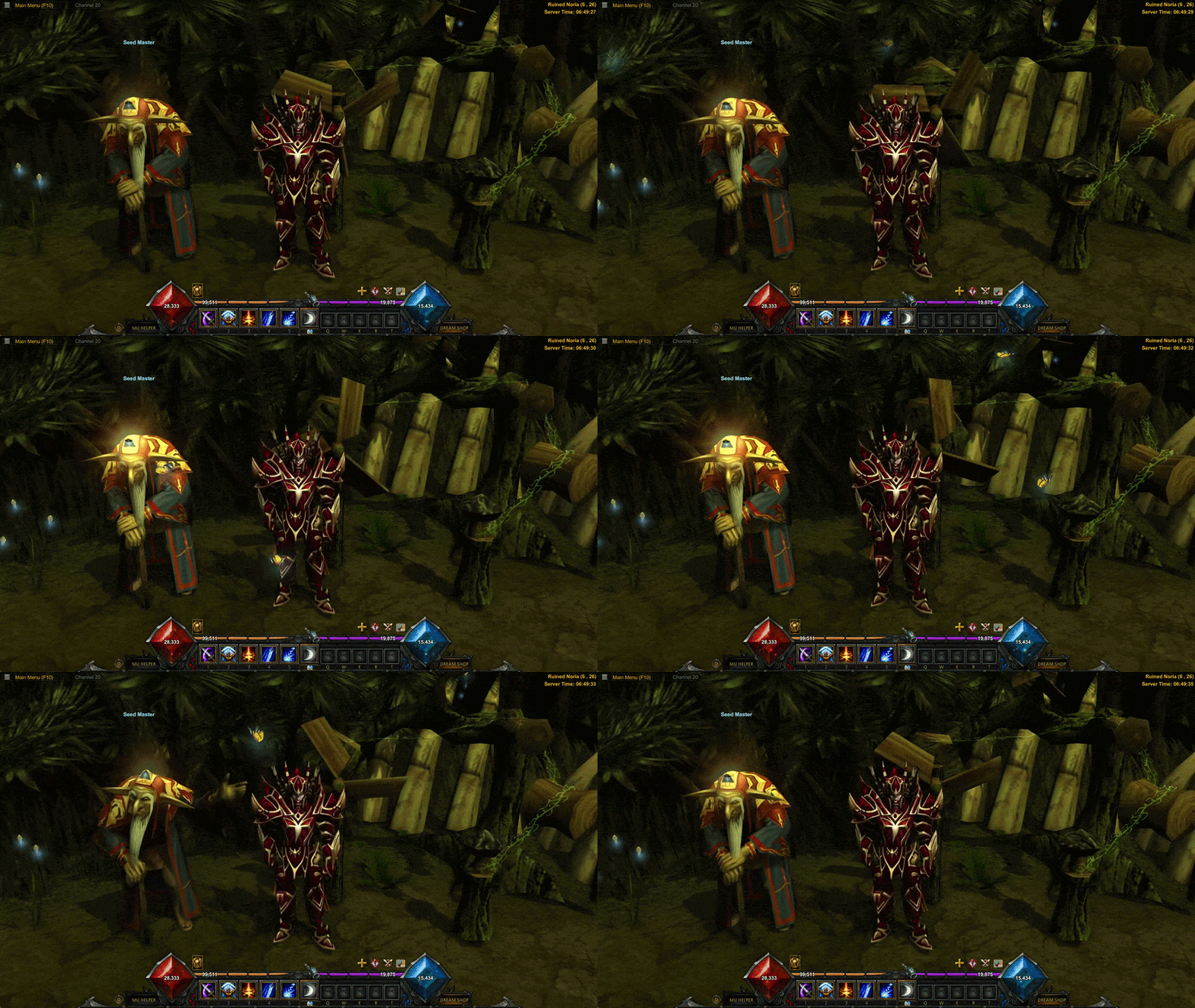
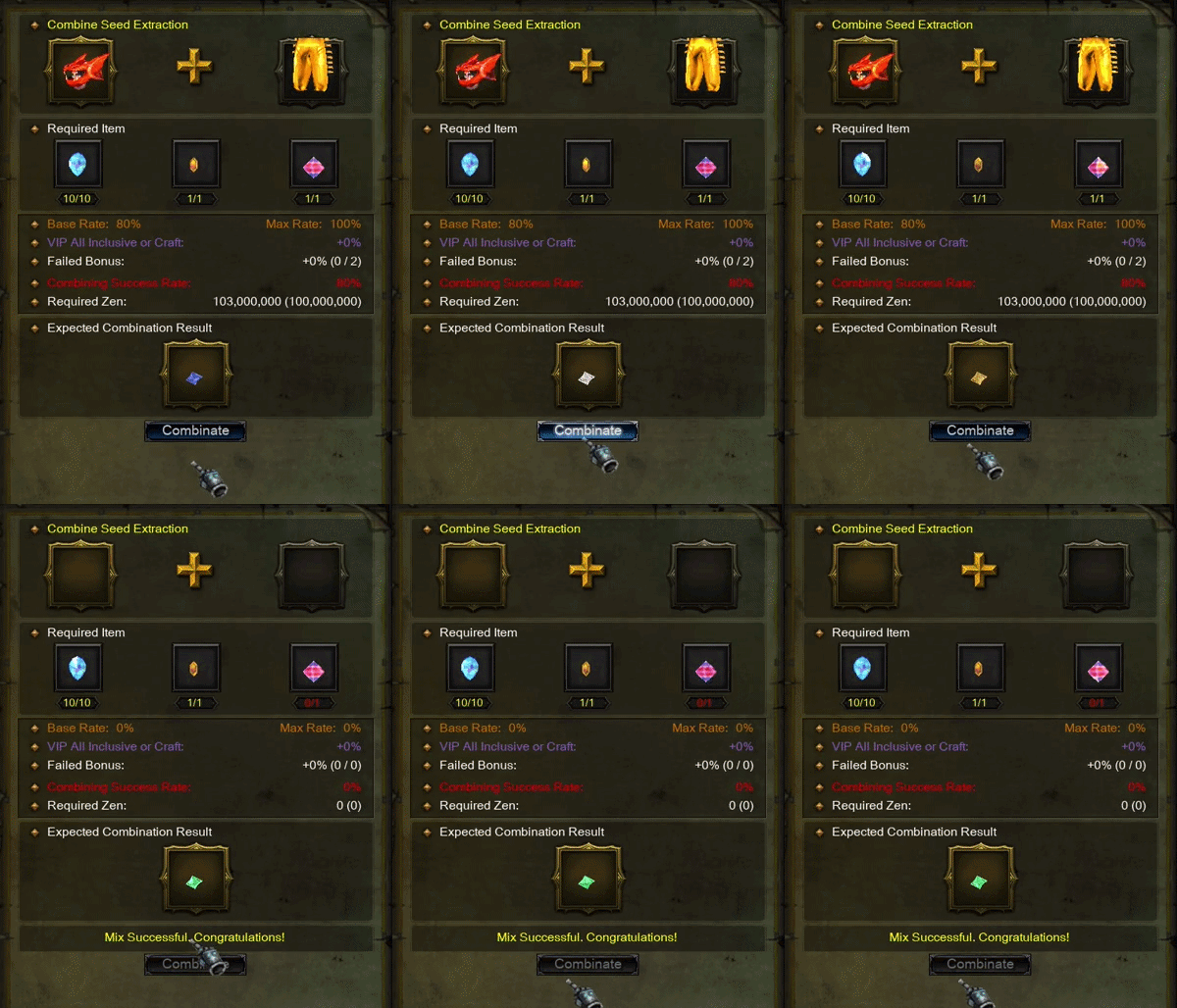
Seed Extraction
Create Seeds from:
10x Jewel of Harmony
Jewel of Chaos
Jewel of Creation
Ancient Item +9 + Add (4)
Excellent Item +9 + Add (4)
100,000,000 Zen
Base Success rate: 80%
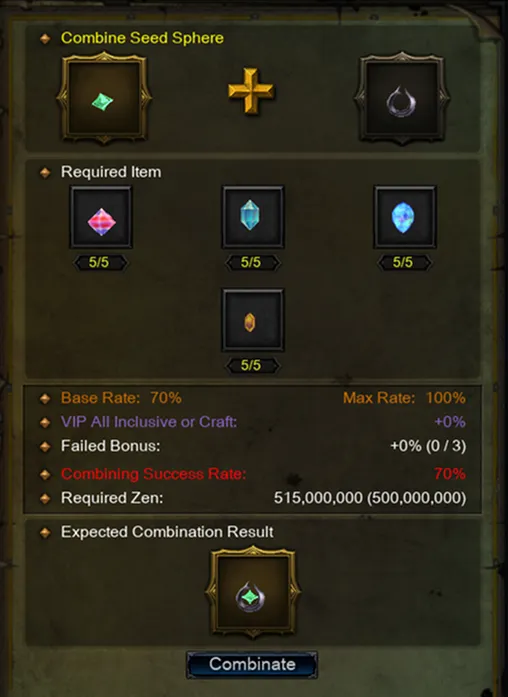
Combine Seed Sphere
to create Seed Sphere.
One of the Seed
Sphere (1 lvl)
x5 Jewel of Creation
x5 Jewel of Harmony
x5 Jewel of Guardian
x5 Jewel of Chaos
500,000,000 Zen
Base Success rate: 70%
If it fails, you get back your Seed, other items will be destroyed.
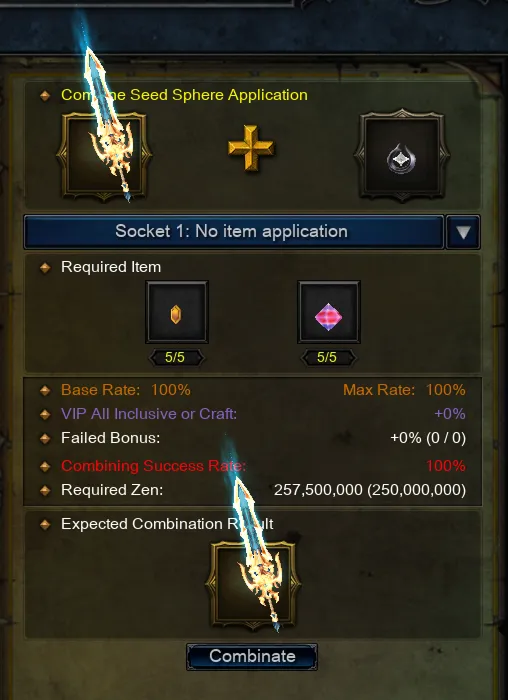
Seed Sphere Application
Add a Seed Sphere to a Socket item.
Socket Item
Seed Sphere
x5 Jewel of Creation
x5 Jewel of Chaos
250,000,000 Zen
Base Success rate: 100%
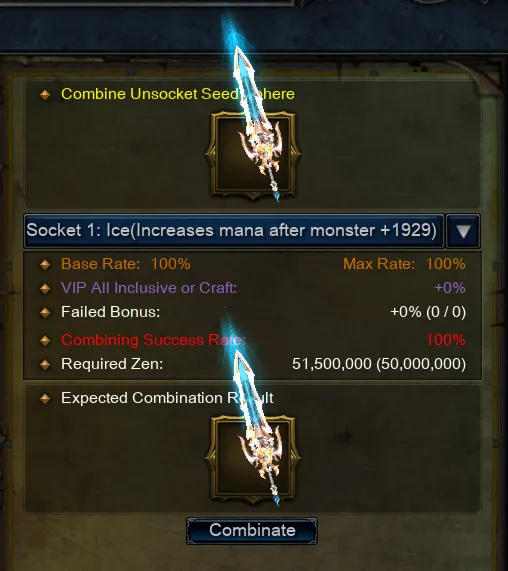
Unsocket Seed Sphere
To remove Seed Sphere
from an item, use the Unsocket Seed Sphere option.
The success chance is 100%, and the Seed Sphere is not lost.
In the Seed Sphere Enhance section, you can upgrade Seed Sphere up to level 5. Each next upgrade requires more resources. To upgrade a Seed Sphere, you need Seed Sphere Main it is the FIRST - the main Seed you want to upgrade, and the SECOND Seed Sphere Sub it is will be GONE - a support Seed of the required level. To upgrade Seed Sphere, you also need Sphere Upgrade Rune, which can be obtained in Ruined Noria.
Seed Sphere level 2
Seed Sphere Main
Seed Sphere Sub lvl 1
20x Jewel of Bless
20x Jewel of Soul
20x Jewel of Chaos
200,000,000 Zen
Base Success rate: 100%
Seed Sphere level 3
Seed Sphere Main
Seed Sphere Sub lvl 2
30x Jewel of Bless
30x Jewel of Soul
30x Jewel of Chaos
200,000,000 Zen
Base Success rate: 100%
Seed Sphere level 4
Seed Sphere Main
Seed Sphere Sub lvl 3
40x Jewel of Bless
40x Jewel of Soul
40x Jewel of Chaos
200,000,000 Zen
Base Success rate: 100%
Seed Sphere level 5
Seed Sphere Main
Seed Sphere Sub lvl 4
50x Jewel of Bless
50x Jewel of Soul
50x Jewel of Chaos
200,000,000 Zen
Base Success rate: 100%
Excellent Tier 8 Socket Manticore Set
Blade Master

Soul Master

Elf

Magic Gladiator

Dark Lord

Summoner

Rage Fighter

Manticore sets can be obtained by killing new World Bosses, Elite Monster Draviel and other Monsters. Manticore items can have up to 2 Socket slots. All items from Bosses drop with 1 empty Socket, from Monsters drop with 0 empty Socket. You can increase the number of Sockets using Jewel of Socket.
⚠️Manticore sets support both Harmony and Socket options.
Jewel of Socket: сan be created with a random mix Jewel:
x10 Jewel of Bless
x10 Jewel of Soul
x10 Jewel of Life
x1 Jewel of Chaos
20,000,000 Zen
Ancient tier 7 Darkangel Set
Blade Master

Soul Master

Elf

Magic Gladiator

Dak Lord

Summoner

Rage Fighter

New T7 Ancient Darkangel sets are added. To upgrade an item from T6 to T7,
you need Jewel of Exalt. Use it on a T6 item with [T6] Ancient +11 +(7) Add. Jewel of Exalt is crafted in the Chaos Goblin Machine.
⚠️It is possible to increase up to 100% due to the use VIP of Craft/All Inclusive and Talismans of Luck. If the craft is successful, you get Jewel of Exalt. If it fails, all used items are destroyed.
Jewel of Exalt mix
x90 Jewel of Bless
x90 Jewel of Soul
x20 Jewel of Chaos
Ancient Armor +13 + Add (1)
400,000,000 Zen
Base Success rate: 80%
NEW crafts
Earring of Deception
Earring of Blood
Deception Frame - ( NPC James in Ruined Lorencia)
x10 Lesser Spirit Stone
x60 Jewel of Bless
x60 Jewel of Soul
x60 Jewel of Life
x60 Jewel of Chaos
x60 Jewel of Creation
6,000,000,000 Zen
Base Success rate: 85%
⚠️It is possible to increase up to 100% due to the use VIP of Craft/All Inclusive and Talismans of Luck.
If the upgrade is successful, you get orMounts level 3. If it fails, all used items are destroyed.
Mounts level 3 , ,
/ / Mount Lvl 2
x2 Broken Horn
x30 Lesser Spirit Stone
x100 Jewel of Bless
x100 Jewel of Soul
x100 Jewel of Life
x100 Jewel of Chaos
x100 Jewel of Creation
4,000,000,000 Zen
Base Success rate: 80%
⚠️It is possible to increase up to 100% due to the use VIP of Craft/All Inclusive and Talismans of Luck.
If the upgrade is successful, you get , or Mounts level 3. If it fails, you get back your Mount Lvl 2, other items will be destroyed.
NEW bosses
Zephtar

Location: Tarkan 2
Respawn: 22:50, 06:50
Drop: T8 Manticore Socket Excellent (1-2 shields)
Golden Hell Maine

Location: Aida
Respawn: 01:50, 15:50
Drop: T8 Manticore Socket Excellent (2-3 weapons)
Abyssal Dreadwing

Location: Shadow Abyss
Respawn: 04:50, 20:50
Drop: T8 Manticore Socket Excellent (4-6 armors)
Frozen King
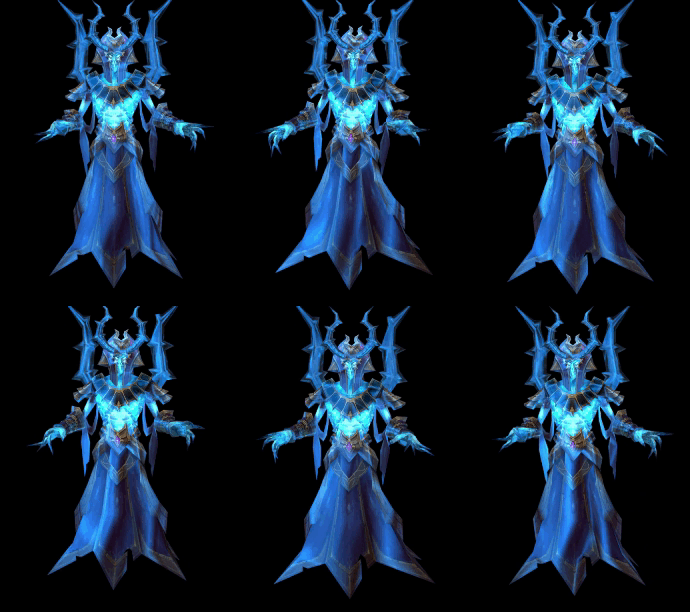
Location: Devias
Respawn: 03:50, 17:50 (+20 min random)
Drop: T8 Manticore Socket Excellent (1-2 weapons, 3-4 armors)
Varyon

Location: Aquilas Temple
Respawn: 23:50 (+20 min random)
Drop: Random Wings 2.5, Condor Feather, Random Wings 3. More valuable the reward, the lower the drop rate.
New location: Aquilas Temple

Aquila Magician

Aquila Gunner

Aquila Warrior

New location, Aquilas Temple, is added with full of Monster. Their level is 130–132. With a small chance, Tier 8 items with no sockets (0 Empty Socket) can drop and can be upgraded to Socket using Jewel of Socket. You can also find Golden Sentence from regular monsters in this area.

Elite Monster: Draviel
Respawn time: 4-6 hours after death
Total monsters: 10
Rare Drop: Tier 7 - 8 Excellent items
Drop: 2-4 random jewel: ,, , ,
Item changes
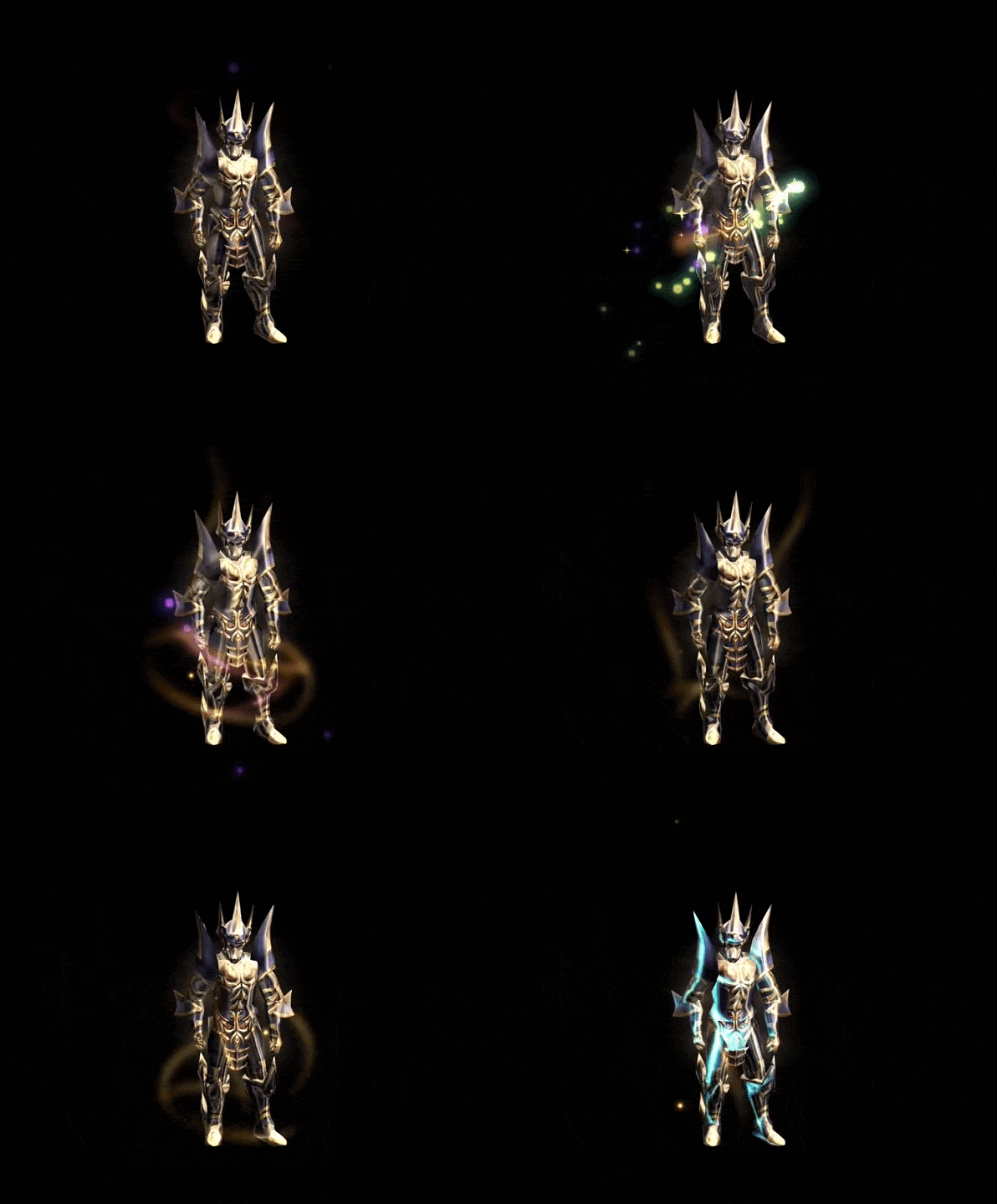
Glow effects for +13 and higher sets have been updated. The effect depends on the upgrade level of the full equipped set. At +13, a golden ribbon appears around the character. At +14, the effect becomes brighter and more active. At +15, the golden glow alternates with a purple glow. The full set must be upgraded to +13, +14, or +15 to show the matching effect. If at least one item has a lower upgrade level, the effect will use the lowest upgrade level in the set.
Glow effects for +13
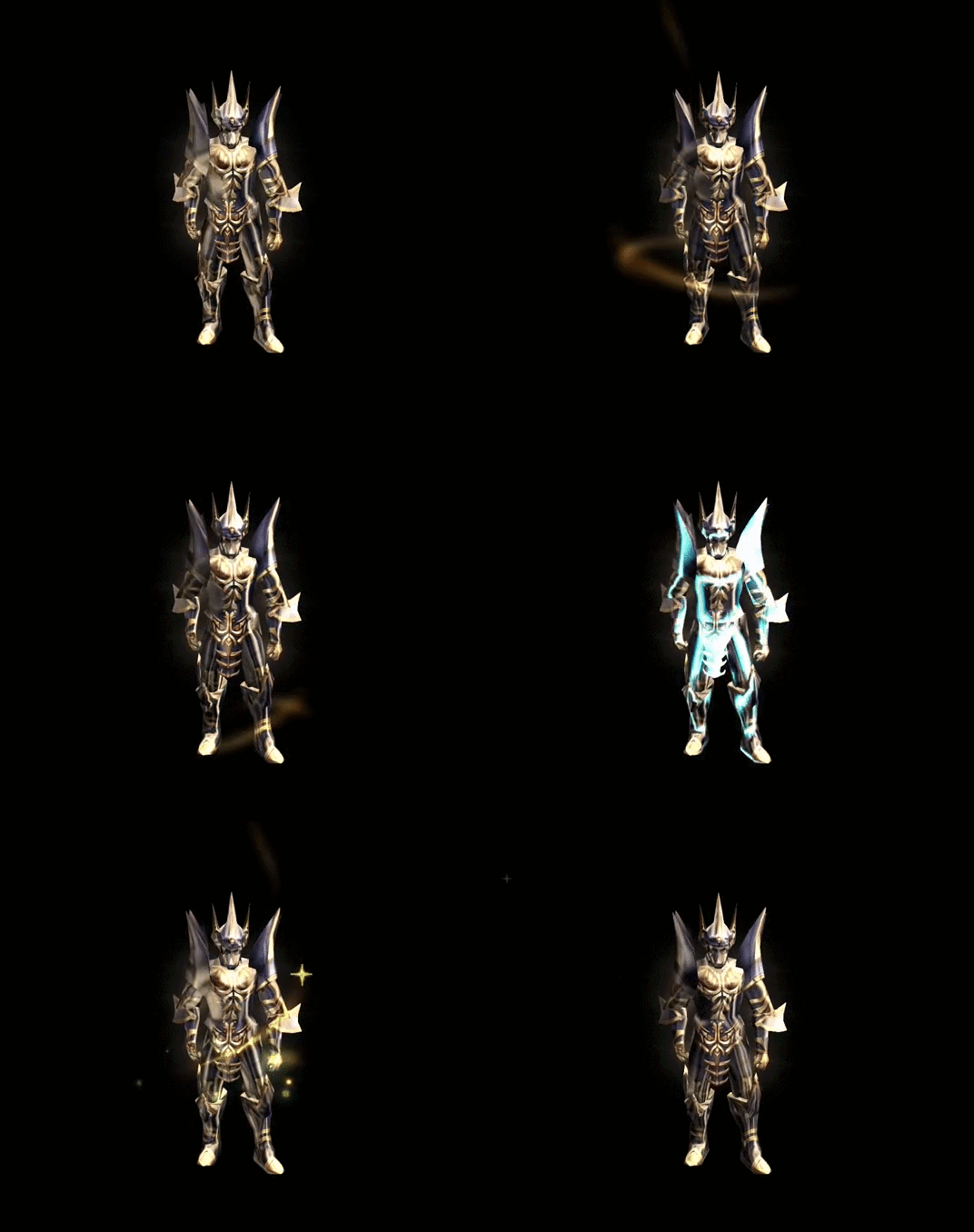
Glow effects for +14
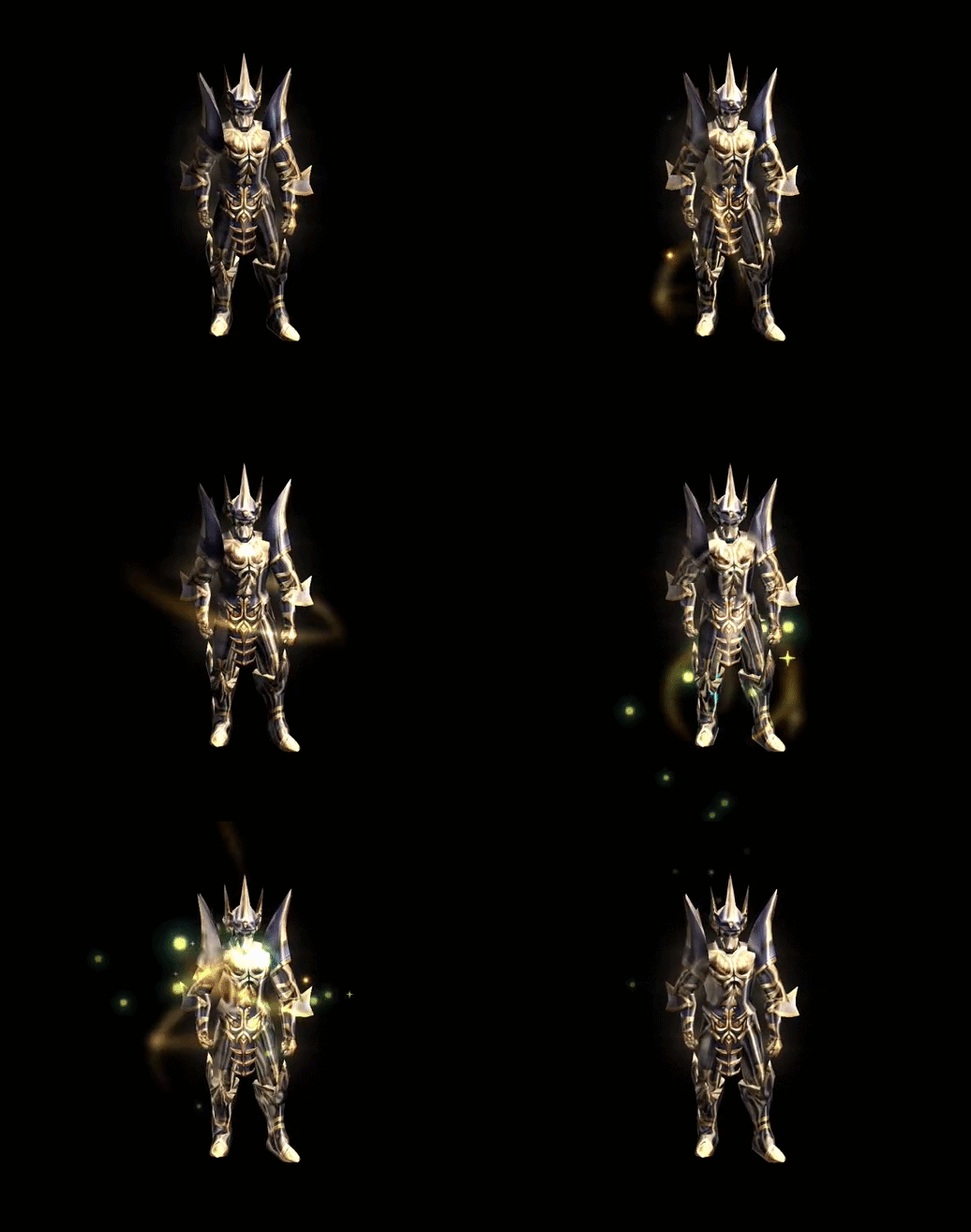
Glow effects for +15
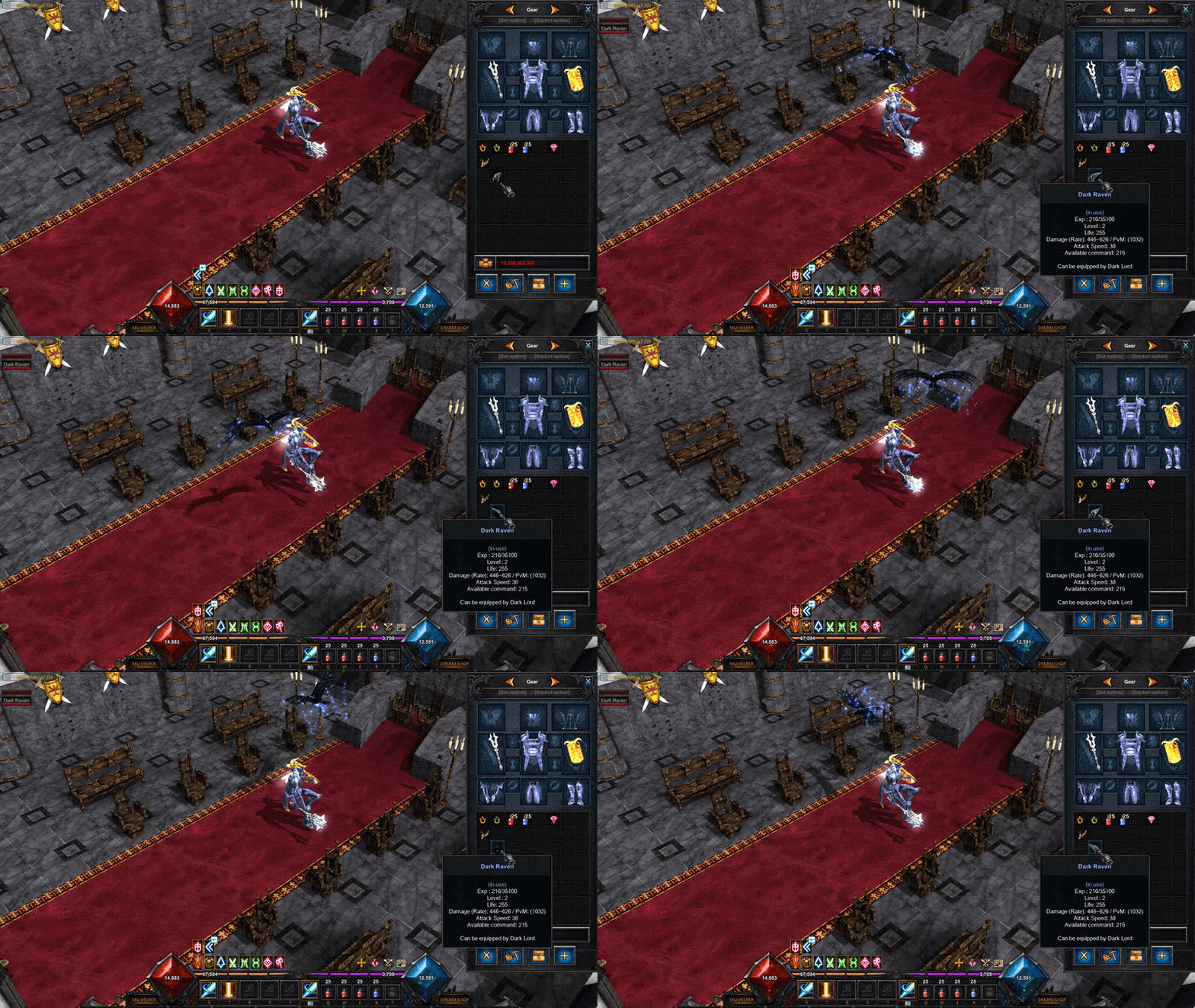
Dark Raven no longer uses the left-hand slot and is now used directly from the inventory. Right-click Dark Raven in your inventory to activate or deactivate it, similar to Charms. Dark Raven with 0 HP cannot be activated. Only one Dark Raven can be active at a time. Its active state is saved when you leave the game and automatically restored when you log in again.
For old characters, an equipped Dark Raven will automatically move to the inventory after the first login following the update. The character also no longer uses the old left-hand animation while Dark Raven is active. Normal Stand and Walk animations are used instead.
The amount of SD restored by Complex Potions has been reduced:
Small Complex Potion: 4% → 2% SD Middle Complex Potion: 7% → 4% SD Large Complex Potion: 10% → 6% SD
The item list in Valor Shop — James has been updated. New items added: Sphere Level 1, Sphere Upgrade Rune, Deception Frame
general updates
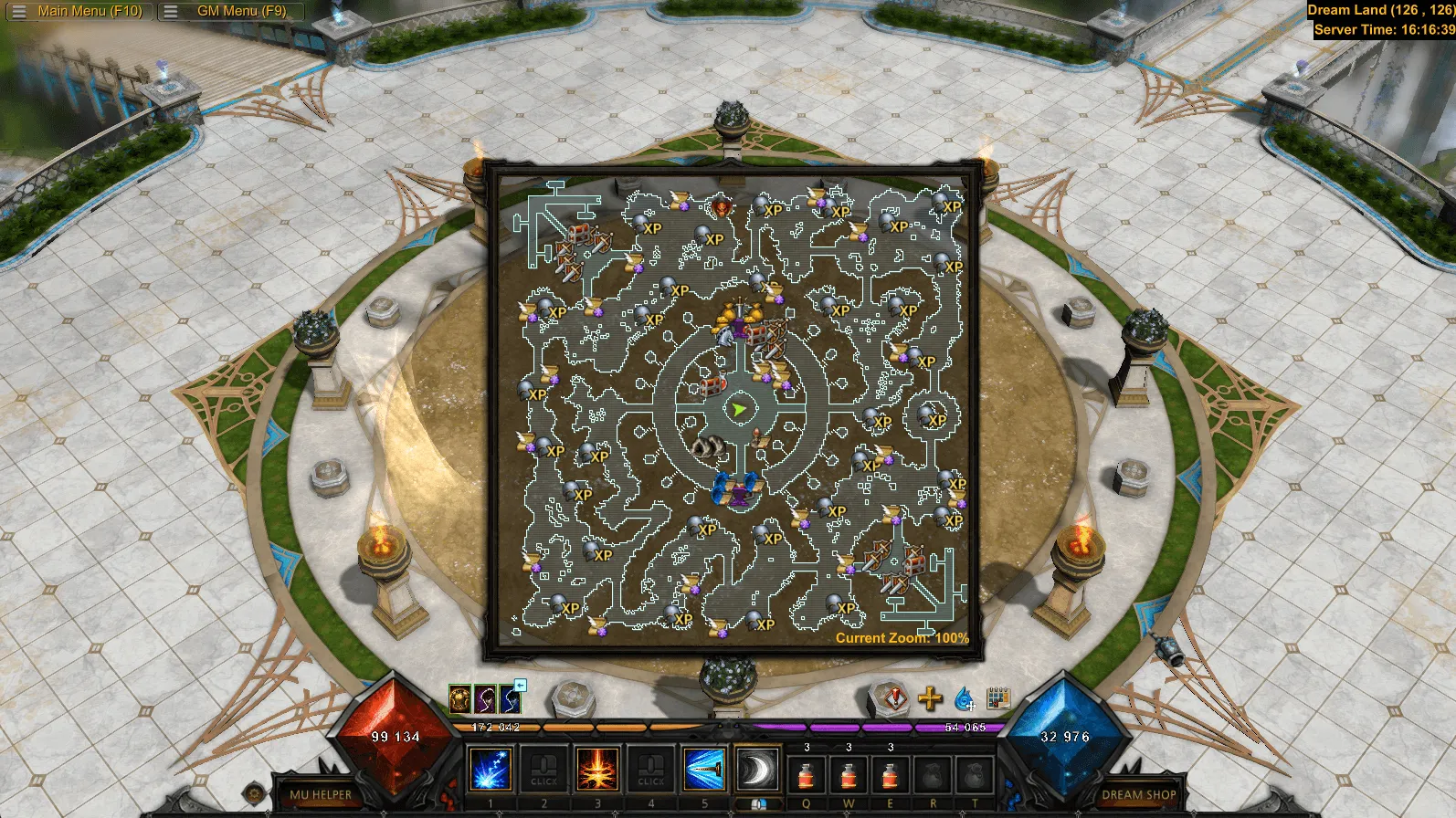
HOT Minimap has been improved and now shows more useful information. You can also adjust its transparency in the settings.
Before
After
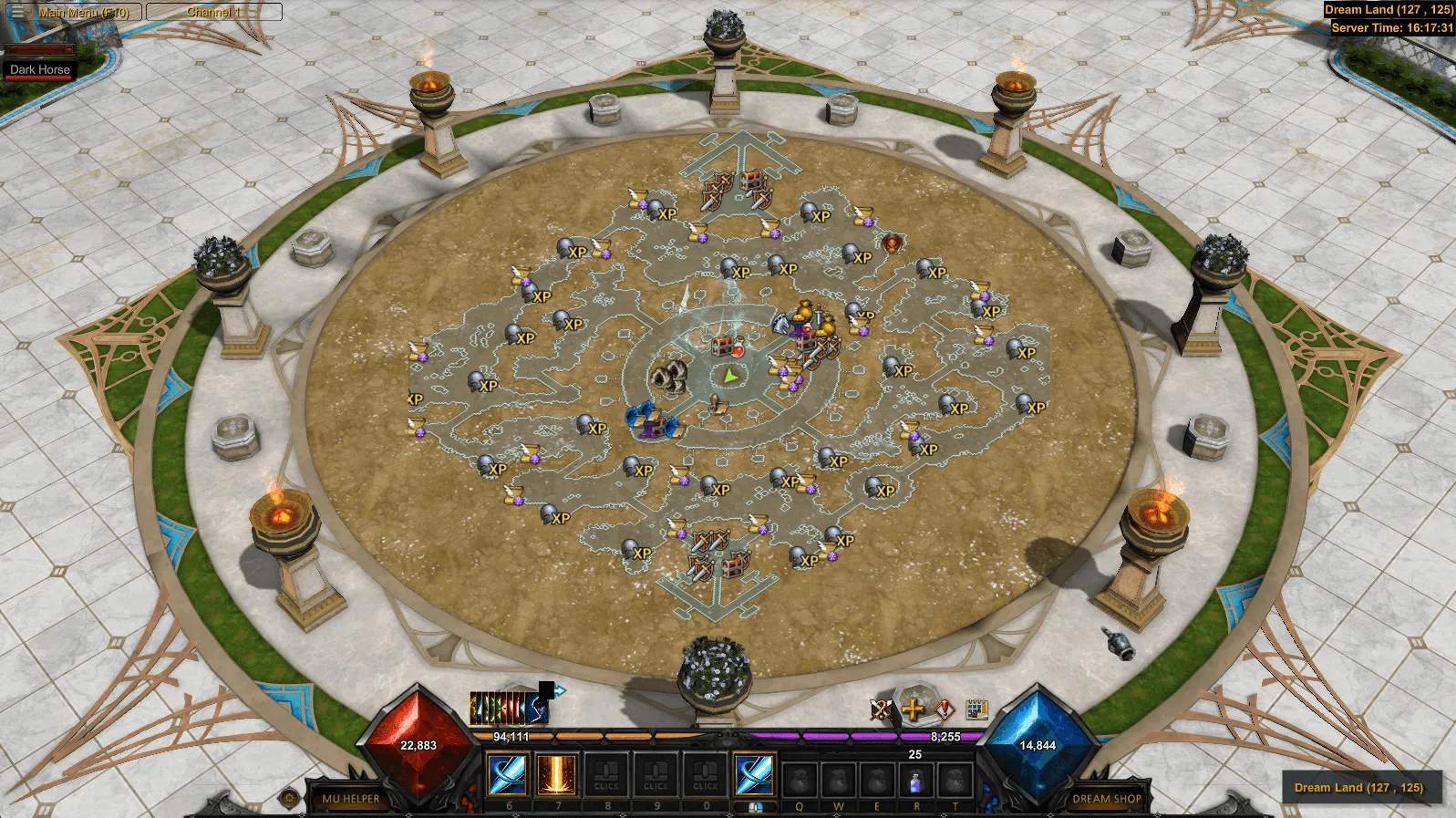
HOT Launcher has been updated with a new Settings menu. The game update process has also changed. Required files are now downloaded directly by the game client, without a separate update process through the launcher.
HOT Defense calculation has been changed. Defense now has a greater effect on damage received, making it more important in combat.
HOT Added the option to scale the UI up to 120% in Settings (O).
HOT UI Scaling Improvements. Large windows are no longer cut off on low resolutions or when UI Scale is above 100%. The interface now automatically fits the screen without covering the HUD.
Сhat, skill bar, and HUD keep the size selected in your settings.
HOT Improved image loading speed and rendering performance in high-load scenes.
 Magic Gladiator:
  Spiral Slash - Charge-based abilities mechanic has been removed, and the skill range has been reduced from 6 to 4.
Right-clicking a target during Auto Move now cancels the route and allows you to attack immediately.
When buying an item in the Collections menu without enough Zen, a Not Enough Zen message is now shown.
Monsters now regenerate HP when out of combat. If a monster has no target for 10 seconds, it starts restoring 1% of its maximum HP per second until it gets a new target.
Old game client is no longer available. All servers now use the updated Remastered client.
Minimum supported resolution is now 1024×768.
Character nameplates in the Character Selection menu have been updated.
Zen prices in NPC Shop tooltips are now color-coded based on their value, making item prices easier to read when buying or selling.
In solo Dungeons, the Damage Statistics window no longer opens when there is only one player in the room.
Old and unused systems have been removed from the F10 menu, including Old Quest, Grand Reset.
Received EXP is now shown as a notification in the bottom-left corner. Its display time can be adjusted in Settings.
Added a new arrow trail effect for Manticore Bow when using Imperial Arrow.
Soul System point reset buttons have been rearranged.
Buff icons have been slightly increased in size.
Added a tooltip for Dark Raven commands on the HUD.
Equipped items can no longer be placed in the Collections window.
fixes
HOT Fixed an issue that could cause disconnects during mass battles in some cases.
HOT Fixed the normal attack speed without Auto-Attack. Holding the attack button now attacks at the same speed as Auto-Attack.
HOT Fixed missing monster attack effects, including arrows, breath attacks, and projectiles. Damage was not affected — only the animations were missing.
HOT Castle Siege fixes:
Fixed an issue where closed Castle Gates could still allow access to the throne.
Fixed a dark line on the right side of the castle map in the Senior window.
Fixed an issue that allowed Kalima Gates to be dropped during Castle Siege.
Fixed a gap under the EXP bar on 21:9 resolutions.
Fixed OffExp window scaling on high resolutions.
Fixed animations for Death Stab and Fire Blow.
Fixed the mount size in Select Server — mounts are now displayed at the same scale as in-game.
Fixed the attack range of several Knight melee skills, including Death Stab, sword attacks, and Fire Burst.
Fixed the Swell Life effect at 240 FPS.
Fixed an issue where Zen dropped on the ground could incorrectly show an Ancient glow.
Fixed Mu Helper item pickup sometimes skipping the next Zen or Jewel dropped in the same spot as a previously picked-up item.
Fixed Infinity Arrow causing the quiver to appear yellow on the character.
Fixed the Ancient Set glow and added a blue ribbon effect around the character. Upgrade effects are now the same for Ancient and regular sets.
Dragon Spirit now stays in its slot after Upgrade or Repair at the Pet Trainer.
Fixed the effects of Berserker Strengthener and Berserker Proficiency.
Fixed the Guild Announcement History scroll position after changing resolution.
Fixed command icons in the Dark Raven window.
Fixed the Dark Raven animation in Safe Zones — the character now raises their arm and the Raven sits correctly on the hand.
Fixed the Upgrade Rank button — it is now disabled when there is no next rank.
Fixed an issue that could trigger multiple Guild Warehouse checkboxes in a row.
Fixed an issue where clicking HP in the Party window could incorrectly open Party Search, Party Creation.
Fixed a teleport loop to the corner of Lorencia when the Chaos Machine and Guild Window were open.
Fixed animations for several items (staffs, rings, wings, and bows) at high FPS.
Fixed mounts disappearing while sitting or using poses.
Fixed item restoration to the cursor when closing an NPC Shop.
Fixed the Zen amount position in the Guard NPC window.
Fixed long quest descriptions in the Quest Tracker overlapping the counter.
Fixed the Store button at Senior also selecting the Wings slot with the same click.
Fixed long tab names in the Senior window — they are now shortened and scroll on hover.
Fixed portal visual effects in Ruined Lorencia, Devias, and Dungeon Gateway.
Fixed the Quest System title position after changing resolution.